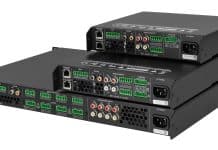
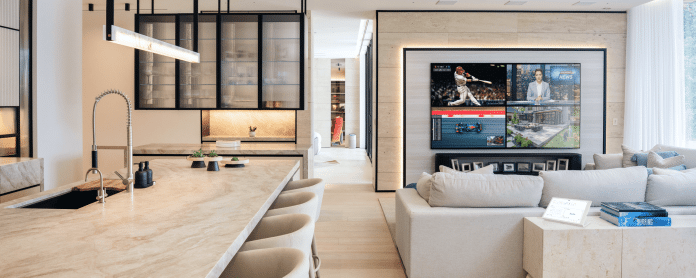
Multiview is the flagship feature of the Crestron Home® OS 4.12 update. Multiview enables multiple video sources to display simultaneously on a single screen across multiple layouts, including picture-in-picture, side-by-side, and quad view. The DM NVX® 384 decoder dynamically composes sources into preset layouts, which can be instantly recalled to suit the application’s needs.
Powered by the Crestron DM NVX® AV-over-IP platform, it’s one of the most compelling AV capabilities Crestron Home OS has ever delivered.
“As soon as a client has a look at this feature, they’ll be sold,” says Michael Short, Crestron VP, Marketing Operations and Residential. “The screen that enables the user to pick their audio and video sources for the layout is simple, intuitive, and elegant, and the virtual ‘remote control’ that allows them to execute all these commands is brilliantly designed.”
“Dealers and their clients have been asking for this feature,” says Short. “There were ways to achieve this, but they usually required extra hardware — such as multiple displays or processors — or an intensive custom-programmed job to yield the same result as advanced and elegant as this.” With this update, Multiview can be configured entirely in our newest tool, Configure Pro, with no custom programming required. (More on that in a moment.)
“This is native to Crestron Home OS, which makes deployment a snap,” he adds. “It’s another illustration of the broad, robust ways we’re revamping video offerings in the platform.”
Multiview was introduced as a feature of the DM NVX AV-over-IP platform a little more than a year ago. With Crestron Home OS 4.12, it’s now completely integrated into Crestron’s best-in-class smart home solution.
Multiview: The Look and the Layouts
Multiview allows the configuration of up to six sources in fixed layouts and the flexibility and scalability of up to 18 compositions. The DM NVX decoder dynamically composes these sources into the preset layouts, which can be instantly recalled to suit the application’s needs.
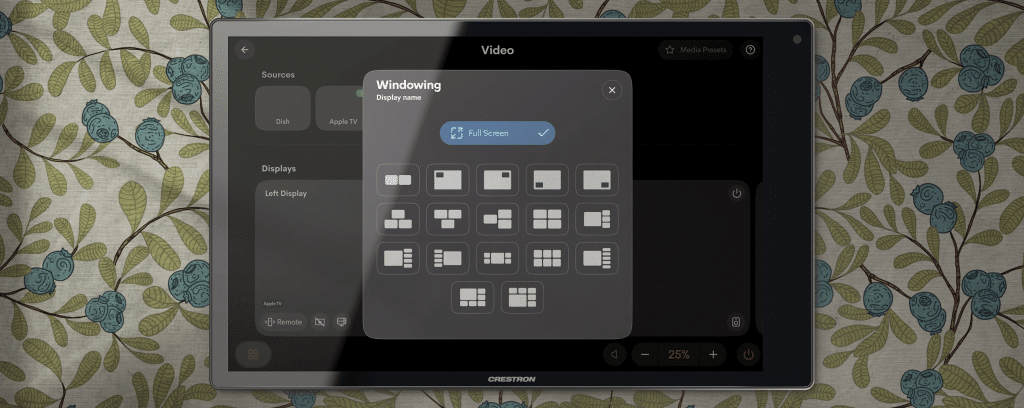
“Suppose a client wants to set a scene for a big NFL weekend,” says Short. “They can choose their preferences and layouts with, say, four different feeds: a couple of broadcast games, a commentary channel, a fantasy football show, what have you. Once that scene’s set, it’s a simple matter to call up that layout with a single touch. “One tap, and you’re ready for prime time.”
Sound and Scalability
Audio switching is easy with Multiview — and because the system’s based on an AV-over-IP platform, it can be deployed in the very largest smart home installations.
When it comes to sound, it’s a simple matter to call up the audio on any image that’s on the screen. And, of course, the scalability of DM NVX AV-over-IP is another plus: You can add as many encoders and decoders as your network can support.
“The onscreen control functions are really intuitive — a familiar icon tells you what audio you’ve selected, and the virtual remote that drives it takes up just the right amount of real estate on that command screen,” says Short.
Multiview Use Cases
With picture-in-picture, side-by-side, quad view, and all the other available layouts, Multiview is ready to tackle any task, from sports to security feed management. The use cases are as boundless as your client’s wishes.
Some examples: It’s early in the morning, and the day’s activities are underway. Your client’s workout program is on. The morning news is on. A dedicated camera helps keep an eye on the kids playing in the backyard. Your client hasn’t touched their coffee yet, and they already have eyes on everything that matters.
As luck would have it, your married clients have two different collegiate rooting interests — both playing in different locales at the same time on a Saturday afternoon. No need to flip back and forth if the two are on the same couch, as both games are visible.
Your client is watching a terrific movie. An outdoor occupancy sensor is triggered. An exterior camera’s CCTV feed is accessed via picture-in-picture.
Other Features in Crestron Home OS 4.12
As with previous updates, the most recent version of Crestron Home OS isn’t limited to a single feature. Other upgrades in OS 4.12 include:
Support for Crestron Cameo Dual Dimmers upon shipping — Crestron’s line of Cameo® keypads and dimmers is growing in popularity (with the new flush mount options making a big splash), and this update offers yet another option for control. Because rooms with multiple loads are common, and the default solution of multiple devices on the wall creates clutter that works against the clean aesthetic clients expect, Crestron has a new Cameo Dual Dimmer. The CM2-DIM2EX solves the problem, providing two independent channels in a single gang box.
Support for Crestron 80 Series 15” Touch Screens upon shipping — The Crestron 80 Series panels include our fastest processor yet, along with a slate of other premium features. Introduced earlier this year, the line included 8” and 10” options, but we’ve added a 15” models to the line for applications where more screen “real estate” is a must.
Support for Horizontal Sheer Tilt Limit Firmware — Control for Crestron’s Horizontal Sheer Shades (now with new fabrics, new vane sizes, and new looks) now includes firmware that allows for the perfect setting, every time — and that firmware’s supported with OS 4.12.